How to Live-Stream a Conference in Kampala: A Planning Guide

Streaming Live

Live-streaming a conference has become one of the most effective ways to extend the reach of an event far beyond the room it happens in. For organisers in Kampala, a well-produced stream means your speakers, partners and delegates across Uganda, East Africa and the diaspora can take part in real time. But a professional broadcast is the result of careful planning, not luck. This guide walks you through everything you need to consider, from goals and platforms to the local realities of live streaming services in Uganda.

Start With Your Goals and Audience

Before you think about cameras or platforms, define what success looks like. Are you broadcasting to maximise public reach, or hosting a private, registration-only session for a select audience? Do you want viewers simply to watch, or to interact, ask questions and download materials? Your answers shape every technical decision that follows.

Consider who your audience is and where they are. A stream aimed at Ugandan delegates who could not travel to Kampala has different needs from one targeting international partners in another time zone. Clarifying the purpose early prevents expensive changes later and helps you measure whether the stream actually delivered value.

Choosing the Right Platform

The platform you stream to should match your goals, not the other way around. Each option has strengths:

  • YouTube Live is excellent for public reach, offers a reliable player, archives your recording automatically and embeds easily on your website.
  • Facebook Live works well when your audience already follows your organisation’s page and you want social sharing and comments built in.
  • Zoom or a dedicated webinar platform suits private, interactive sessions where registration, polls and structured Q&A matter more than open reach.
  • Hybrid setups stream simultaneously to several destinations, or combine an in-person audience with remote viewers and remote speakers joining live.

For many conferences, a hybrid approach delivers the best of both worlds, but it also demands the most planning. Decide early, because the platform affects your encoder settings, branding and engagement strategy.

Internet and Redundancy: The Make-or-Break Factor

In Uganda, connectivity is the single biggest risk to any live broadcast, and it deserves more attention than any other technical element. A dropped stream at the keynote moment undoes months of planning. Plan as if your primary connection will fail, because one day it will.

  • Test the venue’s bandwidth in advance. A speed test on the actual event network, at a time of day similar to your event, tells you far more than a promise from the venue.
  • Always carry a backup connection. A second internet source on a different provider, ideally a different technology such as a separate fibre line or a 4G connection, protects you if the main link drops.
  • Use a bonding or automatic failover device where possible, so the stream switches connections seamlessly without viewers noticing.
  • Reserve generous headroom. Streaming needs stable upload speed, not just download. Never plan to use every last megabit of the available bandwidth.

Treat power the same way. Pair your connectivity plan with a backup power source so a brief outage does not end your broadcast.

Multi-Camera Setups

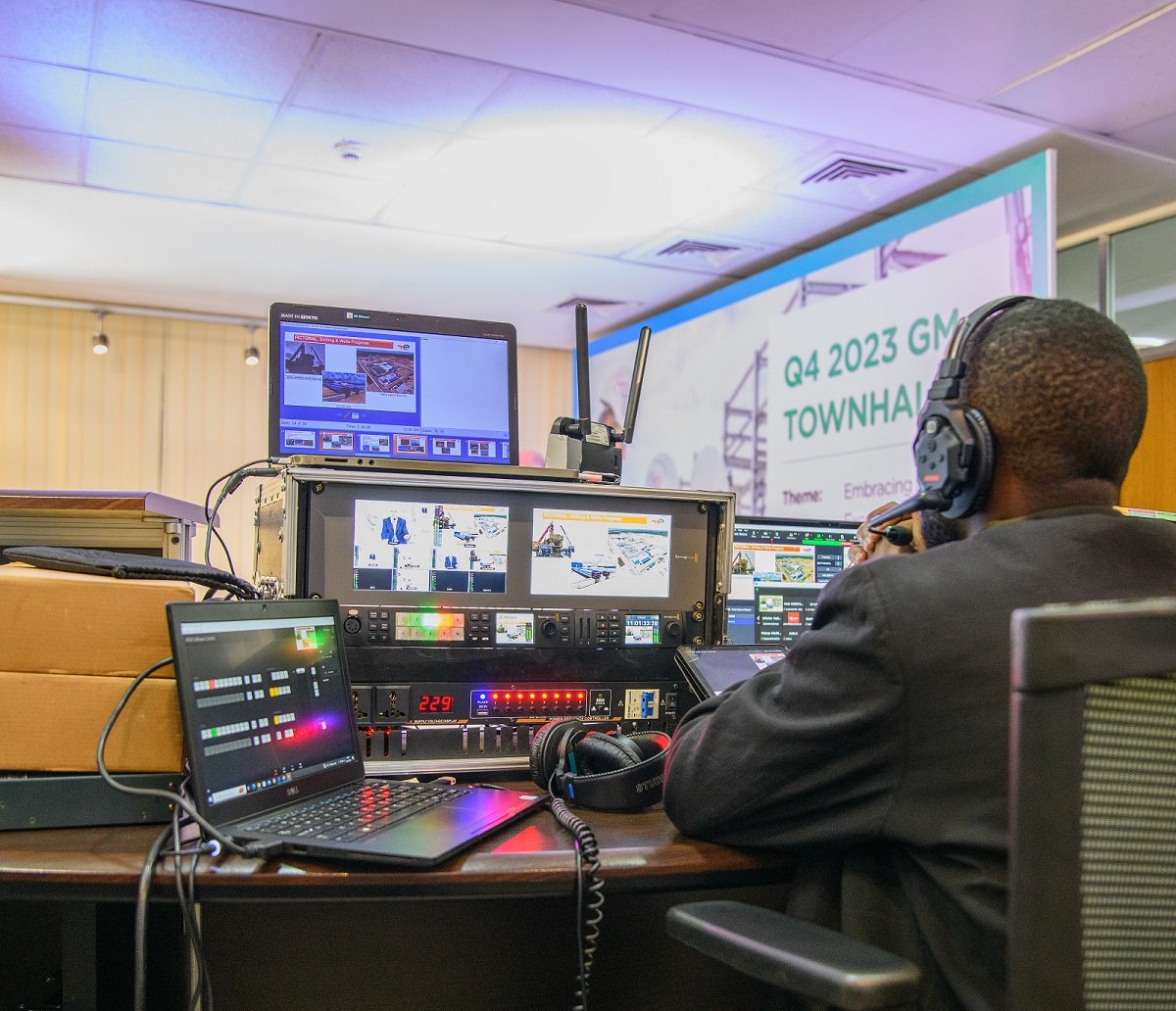
A single static camera can work for a short talk, but a conference deserves more. A multi-camera setup keeps the broadcast visually engaging and lets you cut between a wide stage shot, a close-up of the speaker and a view of the slides or panel.

At a minimum, consider a wide shot of the stage, a tighter shot on the speaker and a dedicated feed for presentation slides captured directly from the laptop rather than filmed off a screen. A vision mixer or switcher lets an operator cut between these sources live, producing a polished result that holds viewers’ attention far better than a single angle.

Audio: The Most Common Point of Failure

Audiences will forgive imperfect video, but they will leave a stream with poor sound within seconds. Audio is the most common failure point in live broadcasts, so give it the attention it deserves.

Take your audio feed directly from the venue’s sound desk or dedicated microphones rather than relying on a camera’s built-in microphone, which picks up room echo and crowd noise. Use proper lapel or handheld microphones for speakers, monitor the audio with headphones throughout, and always have spare microphones and fresh batteries on hand. Clean, clear sound is what makes a stream feel professional.

Branding, Graphics and Lower-Thirds

Professional graphics turn a raw camera feed into a branded broadcast. Lower-thirds that introduce each speaker by name and title, your organisation’s logo, holding slides for breaks and a tidy opening title all signal quality and reinforce your brand throughout the event.

Prepare these assets before the event day, with correct names, titles and spellings confirmed in advance. Consistent, on-brand graphics are especially valuable for corporate events where presentation reflects directly on the organisation hosting the gathering.

Build a Run-of-Show and Rehearse

A run-of-show is a minute-by-minute document mapping out the entire broadcast: when the stream goes live, the opening titles, each speaker and session, planned breaks, and the close. It keeps the production team, the venue crew and the event organisers working from the same script.

Rehearsal is non-negotiable. A technical run-through on the actual equipment and venue network lets you catch problems while there is still time to fix them. Test every camera, every microphone, the graphics, the failover connection and the stream itself to your chosen platform. The confidence a rehearsal brings on event day is well worth the time it takes.

Record Everything for Repurposing

Your live broadcast should not be a one-time event. Always capture a high-quality local recording in addition to the stream, ideally an isolated recording of each camera and the clean audio feed. This footage becomes a library you can edit into highlight reels, individual speaker sessions, social media clips and on-demand content long after the event ends, extending its value for months.

Engagement: Q&A and Chat Moderation

Interaction is what separates a passive video from a genuine event experience. Decide how remote viewers will ask questions, whether through the platform’s chat, a dedicated form or a moderated Q&A tool. Assign a person to moderate the chat, surface the best questions to your host and keep the conversation respectful and on topic.

Good moderation makes remote attendees feel as involved as those in the room, and it gives your speakers a steady flow of relevant questions to respond to. It is a small role with a big impact on how your audience remembers the event.

Bringing It All Together

A successful conference stream in Kampala comes down to disciplined planning: clear goals, the right platform, redundant internet and power, a thoughtful multi-camera setup, flawless audio, professional branding, a rehearsed run-of-show and active audience engagement. Get these right and your event reaches and resonates with an audience many times larger than the room.

Mara Mambo Media plans and produces professional live broadcasts for conferences and events across Kampala, Uganda and the wider East African region. If you are ready to reach an audience beyond the room, stream your next event with a team that handles the technical detail so you can focus on the message.

Planning a Documentary Shoot in Remote Uganda

Documentary Photography Uganda

Few things test a film crew like a remote shoot. The light is extraordinary, the stories are rich, and the landscapes are unforgettable, but the conditions are unforgiving. Roads disappear in the rains, power is scarce, and the nearest hardware shop may be a day’s drive away. Successful documentary film production in Uganda depends less on luck and more on careful preparation. This guide walks through how we plan and execute a documentary shoot in the field, from the first research notes to the final backup drive.

Start with research and story development

Every strong documentary begins long before the camera rolls. Spend time understanding the subject, the place and the people. Read what has already been written, speak to people who know the area, and shape a clear central question your film intends to explore. A documentary without a spine becomes a collection of pretty shots, so define the story you want to tell while staying open to what the field reveals.

Build a realistic shot list and a loose narrative outline, but treat both as living documents. Remote stories rarely unfold as planned, and the best moments are often unscripted. Knowing your story well enough to recognise those moments, and to let go of the ones that no longer serve it, is the heart of good documentary photography and film.

Plan the recce carefully

A recce, or location scout, is the single most valuable investment you can make before a remote shoot. Whenever budget allows, visit the location in advance. Note the direction and quality of light at different times of day, identify where you can position equipment, and check for noise, crowds and other practical obstacles.

If a physical recce is impossible, conduct a thorough remote one. Speak to local contacts, study maps and satellite imagery, and gather as much detail as you can about access routes, distances and seasonal conditions. A recce also helps you anticipate the logistics that follow, from how many vehicles you need to where the crew will sleep.

Permissions and community engagement

Filming in remote areas almost always requires permission, and the requirements vary by location and subject. Protected areas, cultural sites and certain public spaces may call for permits, so research the relevant authorities early and allow plenty of time for approvals. Arriving without the right paperwork can stop a shoot before it starts.

Equally important is community engagement. When you film in someone’s home, village or place of work, you are a guest. Introduce yourself, explain your project honestly, and seek consent from the people you intend to film. Working respectfully with local leaders builds trust, opens doors and produces more authentic footage. Treat the relationship as ongoing rather than transactional, and the community will often become your greatest ally.

Logistics: the make-or-break details

Remote logistics are where good intentions meet hard reality. Plan each element deliberately.

  • Transport: Choose vehicles suited to the terrain and carry recovery equipment, spare fuel and basic spares. Build extra travel time into the schedule for poor roads and delays.
  • Power: Assume you cannot rely on mains electricity. Carry enough charged batteries for several days, plus power banks, a reliable inverter and, where practical, a portable generator or solar charging.
  • Connectivity: Mobile coverage can be patchy or absent. Download offline maps, share a detailed itinerary with someone outside the team, and consider a satellite communicator for genuinely remote work.
  • Weather: Conditions can shift quickly. Track forecasts, protect gear from dust and rain, and keep your schedule flexible enough to chase good light or wait out a storm.
  • Accommodation and supplies: Confirm where the crew will rest and eat. Carry sufficient water, food and a well-stocked first-aid kit, and never assume resupply will be easy.

Gear resilience and backups

In the field, redundancy is not a luxury. Pack with the assumption that something will fail. Carry backup bodies and lenses where you can, along with duplicate cables, batteries, memory cards and chargers. Dust, humidity and vibration are constant threats, so use sealed cases, rain covers and silica gel, and clean equipment regularly.

Keep your kit lean enough to move quickly but complete enough to recover from a failure. The same discipline applies to specialised coverage: if your film calls for aerial and drone coverage, pack spare propellers and batteries and confirm any flight permissions in advance, as restrictions can apply near borders, airports and protected areas.

Work with fixers and local guides

A good fixer is worth their weight in gold. Local guides know the roads, the languages, the customs and the people, and they can solve problems that would stall an outside crew for days. They help arrange access, translate conversations, smooth introductions with communities, and keep you safe by reading situations you cannot.

Engage your fixer early, brief them fully on your goals, and treat them as a genuine member of the team. Their local knowledge often shapes the film as much as any creative decision, and the trust they carry within a community is something no amount of budget can buy.

Data management and backup in the field

Footage you cannot recover may as well never have been shot. Establish a strict backup routine and follow it every single day. Offload cards to at least two separate drives, keep those drives in different bags or locations, and never format a card until the material is safely copied and verified.

Label files clearly, log what you shoot, and note any consent or release details alongside the footage. Power your drives carefully, since interrupted transfers can corrupt data, and protect everything from heat and moisture. A disciplined data workflow is the quiet backbone of professional video production services in challenging conditions.

Safety first, always

No shot is worth an injury. Assess risks honestly before you travel and again on location. Share your plans and check-in times with someone off-site, carry comprehensive first aid, and know where the nearest medical help is. Respect wildlife, water and terrain, and stay alert to changing weather and security conditions. A calm, prepared crew makes better decisions and better films.

Plan for post-production from the start

Post-production begins in the field. Detailed shot logs, clear file naming and well-organised footage save days of work in the edit. Think about how scenes will cut together while you are still shooting, and capture the connective material an editor needs: establishing shots, cutaways, ambient sound and quiet moments between the action.

Back home, build a structured editing workflow, secure your archive with redundant storage, and protect your masters. The care you take on location pays off directly in a smoother, faster and stronger edit.

Ready to tell your story

Planning a documentary shoot in remote Uganda rewards those who prepare thoroughly and stay adaptable in the field. With solid research, careful logistics, trusted local partners and disciplined data handling, even the most demanding locations become an opportunity rather than an obstacle. If you are ready to bring your project to life, our team would be glad to help you plan your documentary from first concept to final cut.

Mara Mambo Media

Mara Mambo Media is a team of young, creative, and versatile production professionals driven by passion and precision. We stand among Uganda’s leading media production companies, mastering the art and trade of videography, photography, and 3D animation.

At our core, we are storytellers. We believe in the power of human narratives — stories that inform, entertain, educate, and inspire. Every idea we craft begins with your story. From that story, we design compelling visual experiences that move people and meet the unique purpose of your brand or audience.

Mara Mambo Media was founded on a simple yet profound belief:
that media — whether visual, audio, or artistic — needed a new lens, a fresh perspective, and a deeper purpose. We represent that shift. Our work embodies transformation, creativity, and authenticity.

Our name, Mara Mambo, draws inspiration from the breathtaking beauty of the Masai Mara — a place of color, wonder, and life. From that inspiration, we visualize stories that mirror the magic of our clients’ ambitions.

Our team combines over eight years of professional experience across multiple disciplines. We bring together diverse talents — men and women who are qualified, imaginative, and relentlessly committed to quality. For every project, we invest time in strategic planning, detailed execution, and uncompromised standards. We never cut corners. We go beyond expectations.

Through every production — big or small — we deliver value, creativity, and reliability. We work longer, think deeper, and move faster because we care about our clients’ stories and the impact they make.

At Mara Mambo Media, we don’t just produce content — we craft experiences that change, transform, and connect.